


Trusted by 1M+ creators
Transparent Background Maker
Remove backgrounds and create transparent PNG images online
No credit card required
4.6
2,100+ reviews















Make background transparent for any image
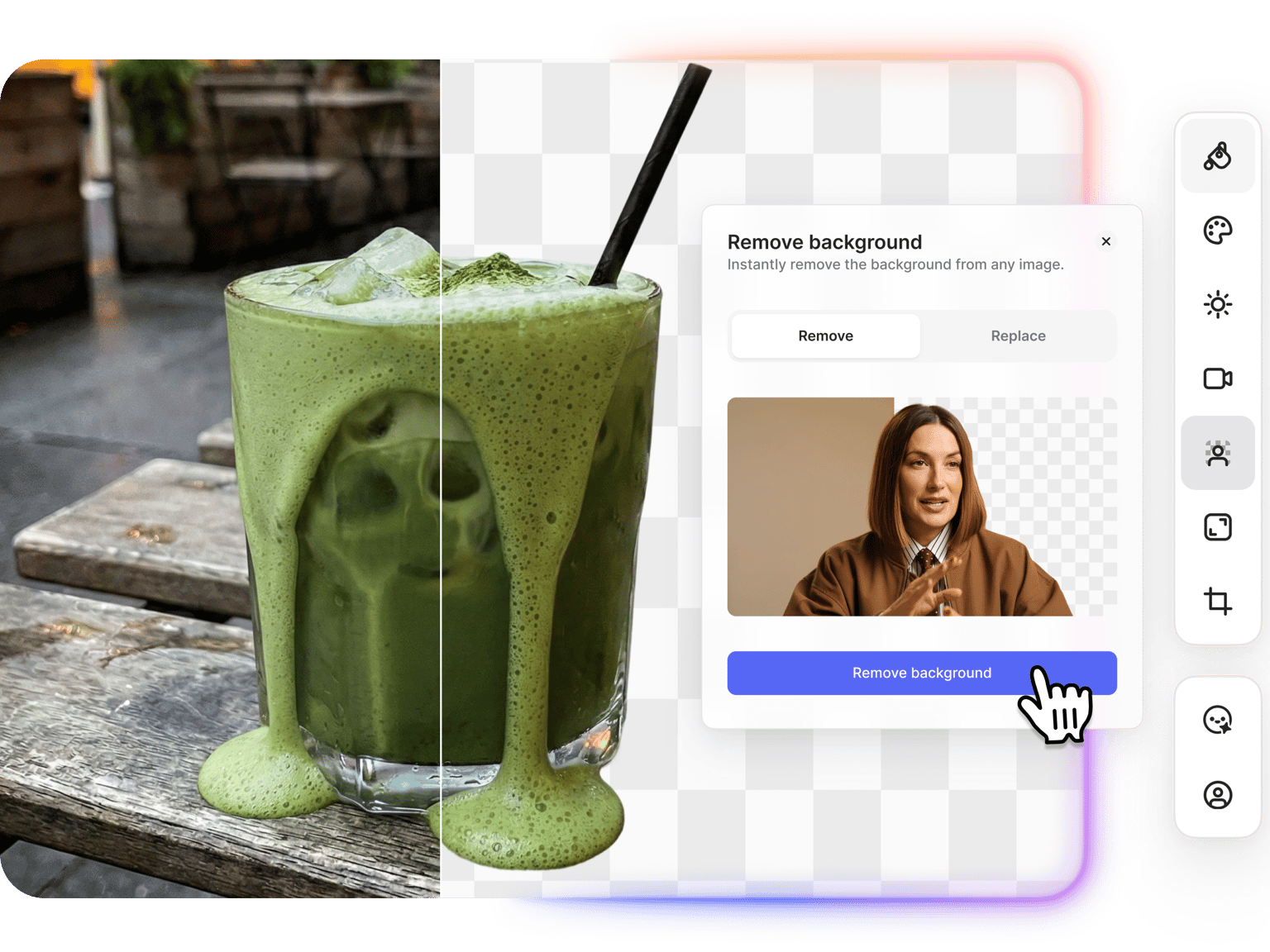
Need to remove an image background and make it transparent? VEED's AI transparent background maker removes backgrounds from photos, logos, and graphics. The AI handles edges cleanly, even around hair and fine details. Download as PNG with transparency preserved. Use your cutouts on designs, websites, documents, presentations, and video projects.
How to make background transparent:
Step 01
Upload your image
Works with portraits, product shots, signatures, and any image where you need a transparent background. You can upscale your image first for better quality.
Step 02
Remove background
Click 'Remove background' and select Remove. The AI detects your subject and removes everything behind it.
Step 03
Download image with transparent background
Save your image as PNG with transparency. Ready to drop into designs, documents, videos, or any platform that supports transparent images.
Learn More
Also check out our video background remover:
AI transparent background tool for logos and graphics
Create transparent backgrounds for logos, signatures, watermarks, and stickers. Remove solid backgrounds from logo files so they sit cleanly on any color or image. Prepare signatures for documents. Make watermarks that overlay videos and photos without blocking content. Download as PNG with transparency and use across websites, social media, print materials, and video projects.
Remove background from photos and thumbnails
Remove backgrounds from portraits, product photos, and YouTube thumbnails. The AI detects your subject and separates it from the background with clean edges. Once removed, download your transparent image or replace the background entirely. Use our AI background changer to add new backgrounds from text prompts. Describe what you want: "beach sunset," "white studio," or "gradient blur."
Add transparent images to video projects
Drop your transparent PNGs directly into video projects. Add logos to videos as overlays, insert product cutouts into promotional content, or layer graphics over footage. VEED connects image editing with video editing in one workspace. Remove a background, download with transparency, and add your logo to video without switching tools.
FAQ
- Upload your image to VEED's transparent background maker.
- Click 'Remove background' and select Remove.
- Download your image as PNG. The transparency is preserved, so you can use it on any background.
PNG is the standard format for transparent backgrounds. JPEGs don't support transparency; if you save a transparent image as JPEG, the transparent areas fill with a solid color. Other formats like GIF and WebP also support transparency, but PNG is the most widely compatible. VEED exports background-removed images as PNG to preserve transparency.
Common uses include:
- Logos for websites and documents
- Product photos for e-commerce listings
- Profile pictures and headshots
- YouTube thumbnails
- Watermarks and signatures
- Stickers and graphics for social media
- Overlays for video projects
VEED’s transparent background maker uses a credit-based system. Background removal costs credits per use. A paid plan with AI credit add-ons gives you access to the transparent background editor, AI background replacement, and the option to bring images into video projects. Check our pricing page for current plans.
Loved by creators.
Loved by the Fortune 500
“
With VEED I didn't need 15 tutorials - I jumped straight in and started editing.

Gwenne Wilcox
Founder,
Brand Brainery
“
You can go beyond choppping things. VEED actually makes my videos look great.

Michael Glover
Demand Gen Manager,
ConvertFlow
“
The first four videos i created with VEED got over 40,000 impressions on LinkedIn.

Travis Tyler
Senior Content Producer,
PandaDoc
“
I found VEED at the right time: if you're making UGC ads and not using Eye Contact Correction and Noise Reduction on VEED you're missing out on ROI.

Sebastian Schurgers
Head of Growth Marketing,
Gronda
“
With VEED I didn't need 15 tutorials - I jumped straight in and started editing.
Gwenne Wilcox
Founder,
Brand Brainery
“
You can go beyond choppping things. VEED actually makes my videos look great.
Michael Glover
Demand Gen Manager,
ConvertFlow
“
The first four videos i created with VEED got over 40,000 impressions on LinkedIn.
Travis Tyler
Senior Content Producer,
PandaDoc
“
I found VEED at the right time: if you're making UGC ads and not using Eye Contact Correction and Noise Reduction on VEED you're missing out on ROI.
Sebastian Schurgers
Head of Growth Marketing,
Gronda
“
The first four videos i created with VEED got over 40,000 impressions on LinkedIn.
Travis Tyler
Senior Content Producer,
PandaDoc
“
I found VEED at the right time: if you're making UGC ads and not using Eye Contact Correction and Noise Reduction on VEED you're missing out on ROI.
Sebastian Schurgers
Head of Growth Marketing,
Gronda
“
With VEED I didn't need 15 tutorials - I jumped straight in and started editing.
Gwenne Wilcox
Founder,
Brand Brainery
“
You can go beyond choppping things. VEED actually makes my videos look great.
Michael Glover
Demand Gen Manager,
ConvertFlow
Discover more
More from VEED
Best AI Image Generators: Top Tools for Creating Stunning Visuals in 2026
From text prompts to breathtaking visuals in mere seconds, AI image generators have revolutionized the way we create digital art. Whether you're building content for social, school, or just for fun, turning ideas into visuals has never been easier. This guide breaks down the best AI image generators of 2025. You'll see what each tool does well, where it struggles, and who it’s built for, so you can pick the right one for your goals and budget.

AI Art Prompts: How to Write Better Prompts, Creative Examples, and Tools to Try
Getting your AI art prompts is the key to winning with generative AI tools. Learn how to write better prompts here.

How to Cartoonize Your Photo with AI (Step-by-Step Guide)
Learn how to cartoonize your photo using AI, and how to use ChatGPT to craft the perfect visual prompt to bring your unique style to life.
Trusted by 1M+ creators
When it comes to amazing videos, all you need is VEED
No credit card required
More than a transparent background editor
VEED gives you image and video editing in one workspace. Remove backgrounds from images, then drop them into video projects as overlays. Need to remove backgrounds from video footage? Use our video background remover for talking heads and product demos. Add subtitles, trim clips, resize for any platform. Edit images and videos without switching tools.