


Trusted by 1M+ creators
Clown Filter
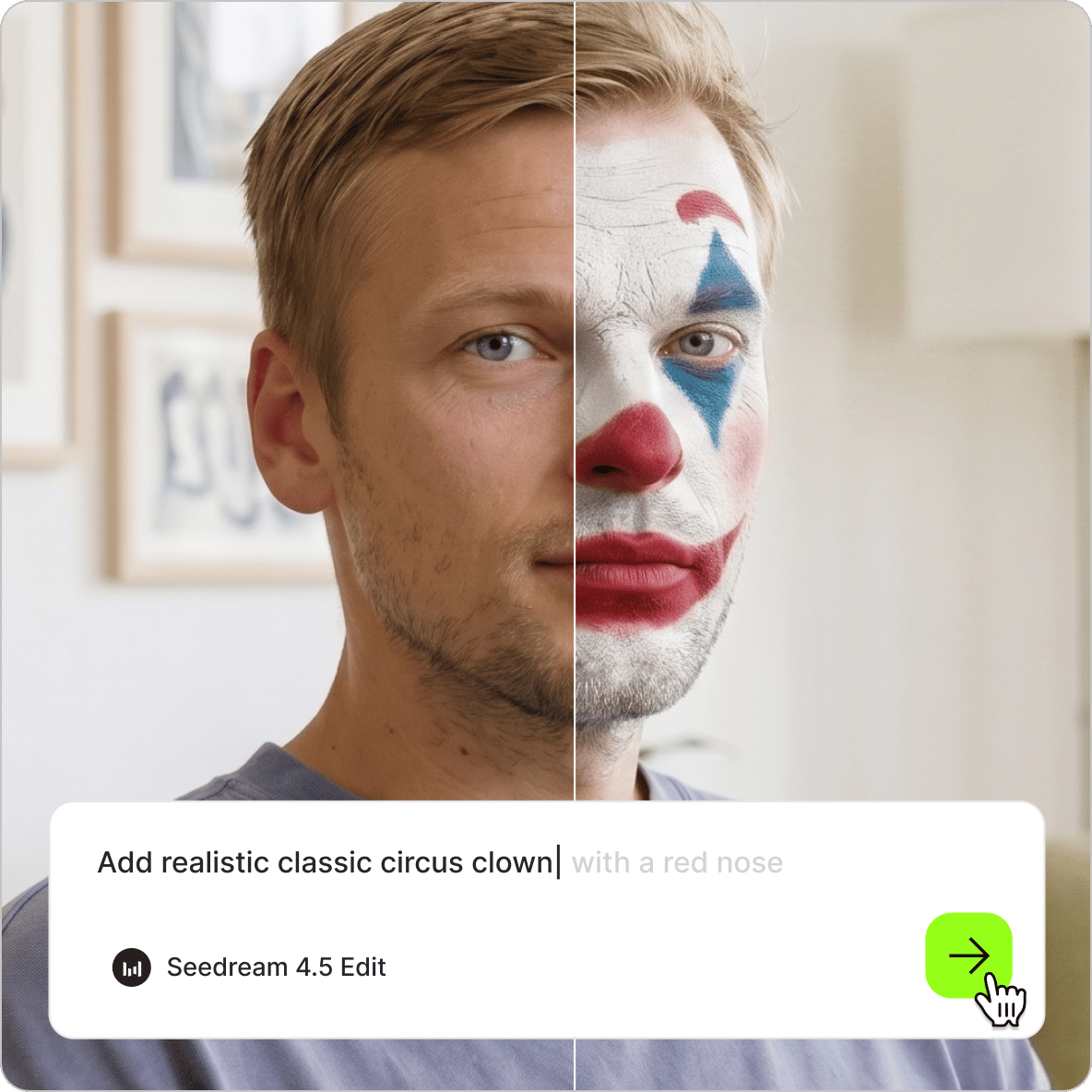
Apply clown makeup to any photo with AI. Choose a fun, scary, or custom clown style
No credit card required
4.6
2,100+ reviews















Turn any photo into a clown face in seconds
The AI clown filter applies any style you describe, from circus-bright face paint to a creepy clown look for Halloween. Upload your photo, type the clown look you want: classic red nose, dramatic Joker-style makeup, or a full carnival character. Generate your image in seconds. Want to turn your clown photo into video content? Animate the image, turn it into a meme, or bring it into a video project without switching platforms.
How to use the AI clown filter:
Step 01
Upload your photo
Upload a clear, front-facing portrait to the image editor. Well-lit photos with visible facial features give the AI the best base for a realistic clown transformation.
Step 02
Describe the clown filter you want
Type a prompt to describe your clown look: classic circus clown with a red nose, scary Pennywise-style clown, vibrant carnival makeup, Joker-inspired face paint, or a subtle jester look. The more detail you include (colors, makeup, accessories), the closer the result gets to your concept.
Step 03
Download image or take it further
Save your clown photo, or take it further with image-to-video AI. Animate the image, create a meme, or drop it into the video editor to create social posts, Halloween content, and more.
Learn More
Watch this Nano Banana Pro demo:
Fun or frightening: describe any clown style
Describe the style you want, and the clown filter applies it to your photo. Classic circus clown, subtle jester, creepy carnival face paint, or full horror clown. Specify makeup colors, face paint, accessories like a red nose or white greasepaint, and hairstyle. Stack multiple details in one prompt: ‘colorful clown makeup with exaggerated eyebrows, bright red lips, and a painted tear.’ Prompt-based control means you’re not limited to a preset filter library. Create a look that matches your creative vision.
Scary clown effects for Halloween and horror content
Beyond fun circus looks, the clown AI handles horror-style transformations. Describe eerie lighting, cracked face paint, a sinister expression, or a full scary clown effect for Halloween posts and spooky content. Explore more visual effects, such as the Ghostface AI. Generate AI Halloween images from text descriptions too. Create any image for party invites and Halloween-themed social media posts.
Turn your clown photo into a post-ready video
One image, multiple assets. Drop your clown photo into the video editor to add captions, sound effects, and music for themed social clips or Halloween posts. Use the same image as a video thumbnail, an in-video graphic, or a profile picture. Want to create talking head content? Make your character image talk using Fabric 1.0. Just type your script or record your voice.
FAQ
- Upload a portrait or selfie to our AI clown filter tool.
- Select an AI model, and describe the clown style you want to apply. Describe the makeup: red nose, white face paint, bold colors, scary details, or a specific character look.
- The AI generates a new version of your photo with the clown filter applied. Download the result or generate pose variations.
Create any clown look you can describe in plain language: classic circus clown with face paint and a red nose, scary or horror clown effects for Halloween, or Joker-inspired dramatic makeup. Combine makeup style with accessories, colors, and expression changes in a single prompt for a complete transformation.
Yes. There are two ways to do it:
- Image meme: Apply the clown filter to your photo in the AI image editor. Specify text captions in your prompt to add text to the image.
- Video meme: Drop your clown photo into the video editor and use the text tool to overlay meme-style captions. Add text frames and export as a short video clip.
Yes. You can generate memes by typing text prompts. Describe a character, choose an AI image model, and generate your custom clown meme.
The clown filter uses a credit-based system. Each image generation costs credits based on the AI model you select. A paid subscription with AI credits gives you access to the clown AI and other image editing and video creation tools. Check the pricing page for more details.
Loved by creators.
Loved by the Fortune 500
“
With VEED I didn't need 15 tutorials - I jumped straight in and started editing.

Gwenne Wilcox
Founder,
Brand Brainery
“
You can go beyond choppping things. VEED actually makes my videos look great.

Michael Glover
Demand Gen Manager,
ConvertFlow
“
The first four videos i created with VEED got over 40,000 impressions on LinkedIn.

Travis Tyler
Senior Content Producer,
PandaDoc
“
I found VEED at the right time: if you're making UGC ads and not using Eye Contact Correction and Noise Reduction on VEED you're missing out on ROI.

Sebastian Schurgers
Head of Growth Marketing,
Gronda
“
With VEED I didn't need 15 tutorials - I jumped straight in and started editing.
Gwenne Wilcox
Founder,
Brand Brainery
“
You can go beyond choppping things. VEED actually makes my videos look great.
Michael Glover
Demand Gen Manager,
ConvertFlow
“
The first four videos i created with VEED got over 40,000 impressions on LinkedIn.
Travis Tyler
Senior Content Producer,
PandaDoc
“
I found VEED at the right time: if you're making UGC ads and not using Eye Contact Correction and Noise Reduction on VEED you're missing out on ROI.
Sebastian Schurgers
Head of Growth Marketing,
Gronda
“
The first four videos i created with VEED got over 40,000 impressions on LinkedIn.
Travis Tyler
Senior Content Producer,
PandaDoc
“
I found VEED at the right time: if you're making UGC ads and not using Eye Contact Correction and Noise Reduction on VEED you're missing out on ROI.
Sebastian Schurgers
Head of Growth Marketing,
Gronda
“
With VEED I didn't need 15 tutorials - I jumped straight in and started editing.
Gwenne Wilcox
Founder,
Brand Brainery
“
You can go beyond choppping things. VEED actually makes my videos look great.
Michael Glover
Demand Gen Manager,
ConvertFlow
Discover more
Explore related tools
More from VEED
Best AI Image Generators: Top Tools for Creating Stunning Visuals in 2026
From text prompts to breathtaking visuals in mere seconds, AI image generators have revolutionized the way we create digital art. Whether you're building content for social, school, or just for fun, turning ideas into visuals has never been easier. This guide breaks down the best AI image generators of 2025. You'll see what each tool does well, where it struggles, and who it’s built for, so you can pick the right one for your goals and budget.

AI Art Prompts: How to Write Better Prompts, Creative Examples, and Tools to Try
Getting your AI art prompts is the key to winning with generative AI tools. Learn how to write better prompts here.

How to Cartoonize Your Photo with AI (Step-by-Step Guide)
Learn how to cartoonize your photo using AI, and how to use ChatGPT to craft the perfect visual prompt to bring your unique style to life.
Trusted by 1M+ creators
When it comes to amazing videos, all you need is VEED
No credit card required
More than a clown filter
VEED is an AI video creation platform that lets you edit images and create content with the best AI models. Explore more than just clown transformations. The AI image editor handles expression changes, costume swaps, background edits, and more. Use the AI expression changer to create image variations and exaggerate expressions. Once you have an image you want to use, bring it to life with AI animation and turn it into a post-ready video. Sign up for VEED now to start creating.