


Trusted by 1M+ creators
AI Mermaid Filter
Turn your photo into a mermaid portrait or a realistic video
No credit card required
4.6
2,100+ reviews















Mermaid AI generator: Create realistic AI mermaid images and videos
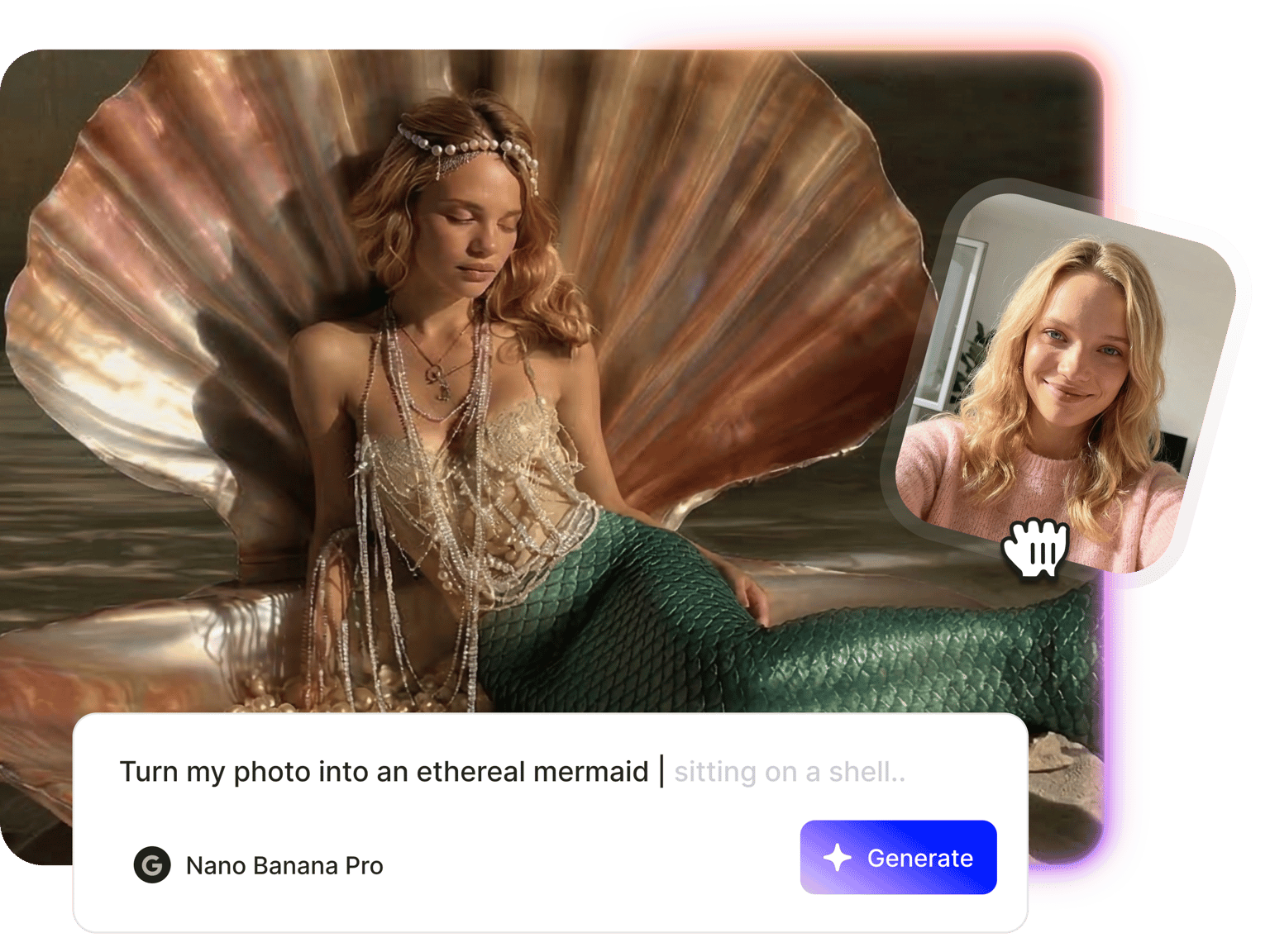
Turn yourself into a mermaid without the cartoon look. VEED's mermaid AI generator creates realistic mermaid portraits — shimmering tails, flowing hair, and underwater scenes. Upload your image and describe the AI mermaid filter you want to see. Generate your image and download. Or turn it into a video using advanced image-to-video models like Google Veo 3.1, Kling 3, and Hailuo 2.3. Go from selfie to TikTok-ready mermaid clip in one workflow. Try our AI mermaid filter now.
How to use the AI mermaid filter:
Step 01
Upload your photo
Upload your selfie, headshot, or half-body portrait. Choose a clear, front-facing photo for best results.
Step 02
Describe the mermaid effect
Select an AI image model; Nano Banana works particularly well for mermaid AI effects. Type a prompt, including details like tail color, flowing hair, and underwater background.
Step 03
Download image or animate
Download your mermaid photo, or switch to image-to-video mode to animate it. Type a prompt like ‘mermaid swimming gracefully with flowing hair’ or ‘underwater scene with soft light rays and floating bubbles.’
Learn More
Watch this Nano Banana Pro demo:
Realistic AI mermaid filter
Apply realistic AI mermaid filters to your selfies and portraits. Describe the transformation you want to see: a shimmering tail, flowing hair, and sunbeams filtering through water. Generate your image and fine-tune it in our AI image editor. Change the hair color or background by typing a prompt. Create mermaid portraits and artwork for social media content, cosplay concepts, and fantasy art.
AI mermaid video generator for TikTok and Reels
Create mermaid photos and videos in one place. No need to switch platforms. VEED lets you move from image generation to AI animation. Apply a mermaid filter to your image, then switch to image-to-video mode to add swimming motion, flowing hair, and underwater effects. Perfect for eye-catching videos on TikTok, Reels, and other fantasy content.
Mermaid AI generator for fantasy characters
Starting from an idea instead of a reference photo? Generate mermaid characters using our fantasy character creator. Just describe your concept to create images using advanced AI models. Describe mermaid tail patterns, hair colors, and underwater kingdoms. Create custom mermaid art for storytelling, book illustrations, or social media posts.
FAQ
The mermaid AI trend went viral on TikTok in mid-2025, with users turning selfies into mermaid portraits and videos. The trend may have peaked, but mermaid effects remain popular for fantasy content, cosplay concepts, and artistic social posts. Our mermaid filter AI lets you create these looks anytime.
Here’s how to turn your photo into a mermaid:
- Go to VEED's image editor in the AI playground.
- Upload your portrait photo or selfie.
- Choose an AI model and describe the mermaid transformation: tail color, underwater scene, lighting, and more.
- Generate and download your mermaid image.
Yes. After generating your mermaid image, switch to image-to-video mode to animate it. Type a prompt to specify movement like floating arms, flowing hair, and underwater lighting. Results may vary depending on the AI model and prompt. For best results, choose an AI model optimized for realistic motion and enter a detailed prompt.
VEED’s mermaid AI generator uses a credit-based system. Each AI model costs different credits per generation. A paid subscription with AI credit add-ons gives you prompt-based image editing, multiple AI models, and image-to-video animation. Check our pricing page for more information.
Loved by creators.
Loved by the Fortune 500
“
With VEED I didn't need 15 tutorials - I jumped straight in and started editing.

Gwenne Wilcox
Founder,
Brand Brainery
“
You can go beyond choppping things. VEED actually makes my videos look great.

Michael Glover
Demand Gen Manager,
ConvertFlow
“
The first four videos i created with VEED got over 40,000 impressions on LinkedIn.

Travis Tyler
Senior Content Producer,
PandaDoc
“
I found VEED at the right time: if you're making UGC ads and not using Eye Contact Correction and Noise Reduction on VEED you're missing out on ROI.

Sebastian Schurgers
Head of Growth Marketing,
Gronda
“
With VEED I didn't need 15 tutorials - I jumped straight in and started editing.
Gwenne Wilcox
Founder,
Brand Brainery
“
You can go beyond choppping things. VEED actually makes my videos look great.
Michael Glover
Demand Gen Manager,
ConvertFlow
“
The first four videos i created with VEED got over 40,000 impressions on LinkedIn.
Travis Tyler
Senior Content Producer,
PandaDoc
“
I found VEED at the right time: if you're making UGC ads and not using Eye Contact Correction and Noise Reduction on VEED you're missing out on ROI.
Sebastian Schurgers
Head of Growth Marketing,
Gronda
“
The first four videos i created with VEED got over 40,000 impressions on LinkedIn.
Travis Tyler
Senior Content Producer,
PandaDoc
“
I found VEED at the right time: if you're making UGC ads and not using Eye Contact Correction and Noise Reduction on VEED you're missing out on ROI.
Sebastian Schurgers
Head of Growth Marketing,
Gronda
“
With VEED I didn't need 15 tutorials - I jumped straight in and started editing.
Gwenne Wilcox
Founder,
Brand Brainery
“
You can go beyond choppping things. VEED actually makes my videos look great.
Michael Glover
Demand Gen Manager,
ConvertFlow
Discover more
More from VEED
Best AI Image Generators: Top Tools for Creating Stunning Visuals in 2026
From text prompts to breathtaking visuals in mere seconds, AI image generators have revolutionized the way we create digital art. Whether you're building content for social, school, or just for fun, turning ideas into visuals has never been easier. This guide breaks down the best AI image generators of 2025. You'll see what each tool does well, where it struggles, and who it’s built for, so you can pick the right one for your goals and budget.

AI Art Prompts: How to Write Better Prompts, Creative Examples, and Tools to Try
Getting your AI art prompts is the key to winning with generative AI tools. Learn how to write better prompts here.

How to Cartoonize Your Photo with AI (Step-by-Step Guide)
Learn how to cartoonize your photo using AI, and how to use ChatGPT to craft the perfect visual prompt to bring your unique style to life.
Trusted by 1M+ creators
When it comes to amazing videos, all you need is VEED
No credit card required
More than an AI mermaid filter
Take your AI-generated mermaid further. Turn your image into a video, complete with music and animation. Add AI voiceovers for narrated fantasy content. Create mermaid transformation reveals, storytelling videos, or fantasy character showcases. VEED streamlines your workflow from image creation to video editing. Start creating now.