


Trusted by 1M+ creators
Script Timer
Read your script with flawless delivery using our teleprompter’s script timer. The best recording companion
No credit card required
4.6
2,100+ reviews















Deliver flawless speech with our words-to-time calculator
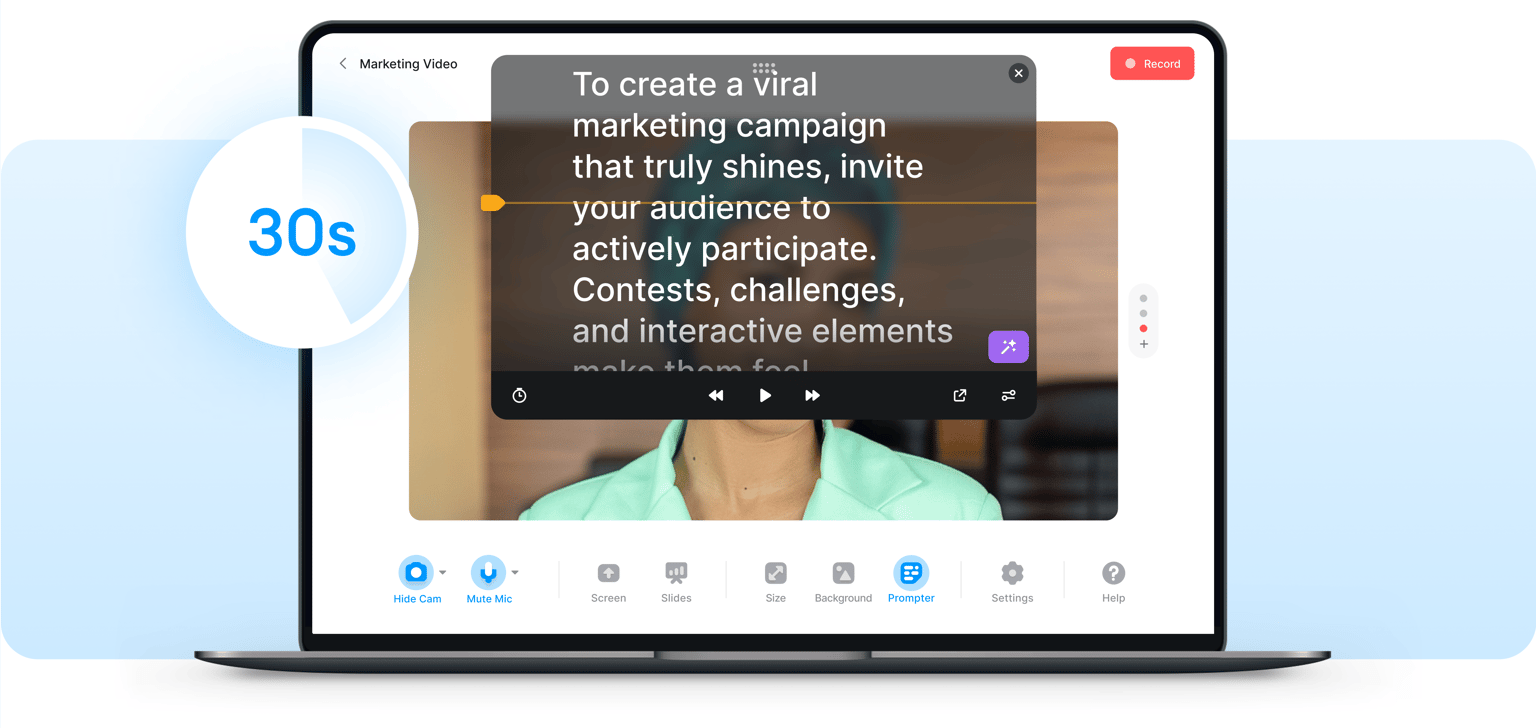
VEED’s script timer lets you read a script while recording at your most comfortable pace so you can deliver your speech flawlessly. Adjust the word timer’s slider left or right to speed up or slow down the pace. Look more confident and professional in your webcam recordings. You will see both your camera feed and your script on the same screen. Avoid stutters and mispronunciations with VEED’s teleprompter and word timer!
How to record and use the script timer:
Step 01
Select a layout
Select from our list of layouts (you may need to click on ‘Allow’ to let the recorder access your screen, camera, or microphone). You can record just your screen, your webcam, or both at the same time!
Step 02
Type or paste your text
Copy and paste or type your script on the Teleprompter window. You can change the color, size, and speed of the text timer.
Step 03
Press the red button
Press the red ‘Record’ button and watch the text auto-scroll as your voice (and webcam if you selected that option) is recorded.
Learn More
Watch this video to learn more about our script timer:
Record with minimal errors with VEED’s read-time calculator
VEED’s teleprompter app includes a built-in word counter and timer to help you read your script with minimal errors while recording. Look and feel more confident and let that transcend into your content. Whether you’re recording a lecture, presentation, or any business communication video, VEED’s text timer is here to help make the entire process pain-free!
Adjust the size, color, and speed of your text
You can change the speed, font, size, and color of your script to make it more comfortable to read as you record. All settings are adjustable to make your recording as smooth and as easy as possible. Read from the teleprompter as if you were in front of the TV cameras and with a live TV audience! Record a video while maintaining direct eye contact with the camera.
Correct eye movements, add subtitles, and more
Our webcam recorder also features a tool that lets you redirect subtle eye movements to the camera. Even if you’re reading a script, our eye contact tool will make it appear like you’re always addressing your audience on screen! Plus, you can use our auto-subtitle tool to make your video accessible to all. Translate your content to multiple languages and more.
FAQ
- Paste your text on the window and click on Start Recording. Make sure to allow permissions
- Select your layout and customize the look and feel of your video
- Edit, download, and share!
Yes, you can! VEED’s online teleprompter and script length calculator also lets you record your screen, webcam, and audio and upload slides simultaneously!
There are many free and paid webcam recording apps with teleprompters. However, if you want a complete voice and video editor, VEED offers the most value for your money. You can record for free, but if you want to access features like Clean Audio and Transcriptions, you need to upgrade your account. You can check our pricing page for more info.
VEED is compatible with Android, Apple, Mac, Linux, and Windows devices.
Loved by creators.
Loved by the Fortune 500
“
With VEED I didn't need 15 tutorials - I jumped straight in and started editing.

Gwenne Wilcox
Founder,
Brand Brainery
“
You can go beyond choppping things. VEED actually makes my videos look great.

Michael Glover
Demand Gen Manager,
ConvertFlow
“
The first four videos i created with VEED got over 40,000 impressions on LinkedIn.

Travis Tyler
Senior Content Producer,
PandaDoc
“
I found VEED at the right time: if you're making UGC ads and not using Eye Contact Correction and Noise Reduction on VEED you're missing out on ROI.

Sebastian Schurgers
Head of Growth Marketing,
Gronda
“
With VEED I didn't need 15 tutorials - I jumped straight in and started editing.
Gwenne Wilcox
Founder,
Brand Brainery
“
You can go beyond choppping things. VEED actually makes my videos look great.
Michael Glover
Demand Gen Manager,
ConvertFlow
“
The first four videos i created with VEED got over 40,000 impressions on LinkedIn.
Travis Tyler
Senior Content Producer,
PandaDoc
“
I found VEED at the right time: if you're making UGC ads and not using Eye Contact Correction and Noise Reduction on VEED you're missing out on ROI.
Sebastian Schurgers
Head of Growth Marketing,
Gronda
“
The first four videos i created with VEED got over 40,000 impressions on LinkedIn.
Travis Tyler
Senior Content Producer,
PandaDoc
“
I found VEED at the right time: if you're making UGC ads and not using Eye Contact Correction and Noise Reduction on VEED you're missing out on ROI.
Sebastian Schurgers
Head of Growth Marketing,
Gronda
“
With VEED I didn't need 15 tutorials - I jumped straight in and started editing.
Gwenne Wilcox
Founder,
Brand Brainery
“
You can go beyond choppping things. VEED actually makes my videos look great.
Michael Glover
Demand Gen Manager,
ConvertFlow
Trusted by 1M+ creators
When it comes to amazing videos, all you need is VEED
No credit card required
More than a script timer
Everything you need to record and edit your videos is right at your fingertips. VEED is more than a recording and script timer tool. It’s a powerful and complete video editing software that lets you create professional-looking videos at a fraction of the time, money, and effort you’d spend on other video dieting apps. Plus, we have plenty of AI tools to help you create the most engaging content—straight from your browser. Explore our powerful video editing suite today!