


Trusted by 1M+ creators
Blur Background
Blur the background of your photo online. Upload an image, describe the blur effect you want, and download
No credit card required
4.6
2,100+ reviews















Blur image background instantly
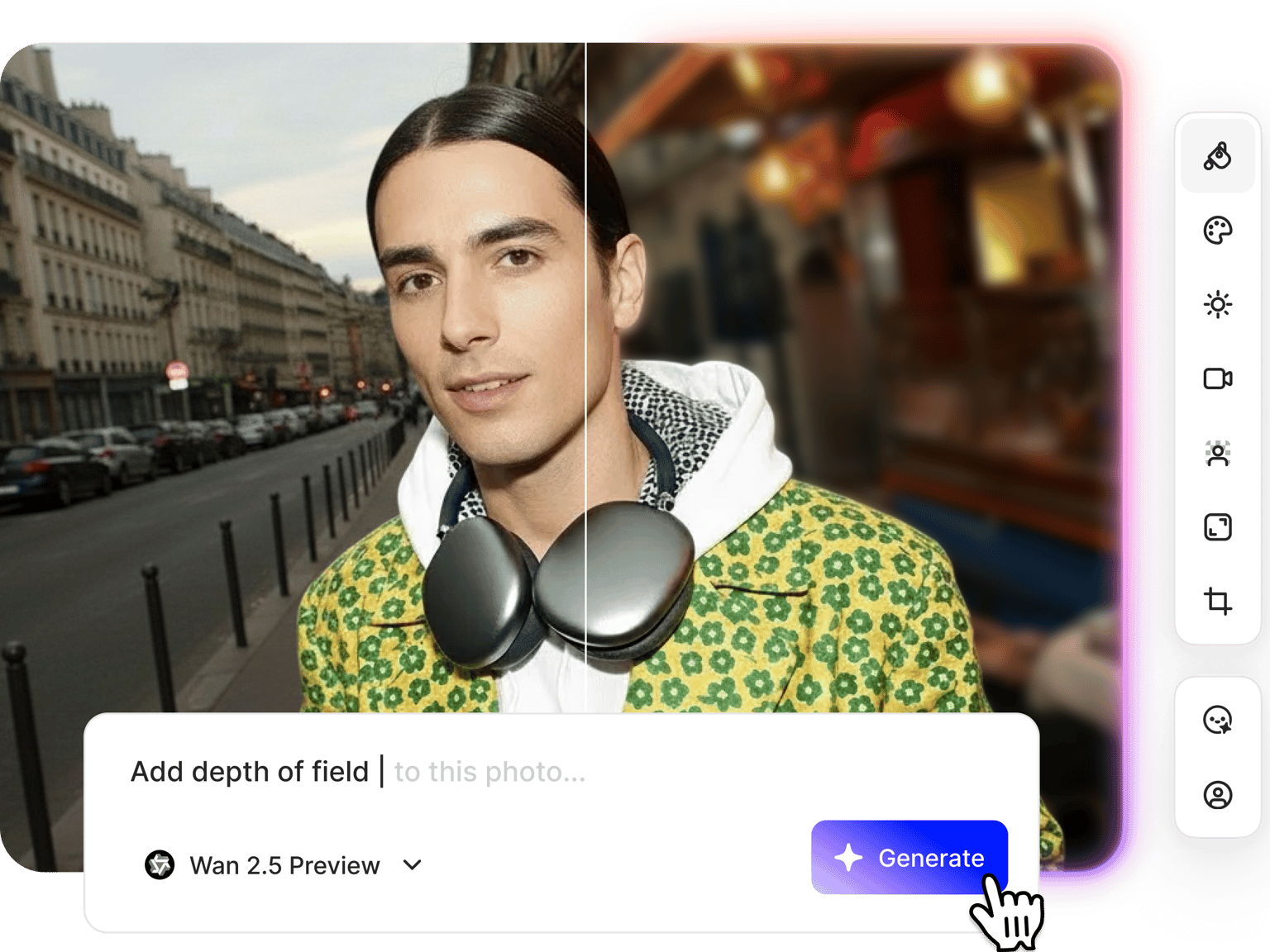
Blur the background of your photo with AI. Upload your image and describe the blur effect you want: "Add soft bokeh blur to background," "Apply gaussian blur, keep subject sharp," or "Blur out the background slightly." Make your subject stand out. The blur background app identifies your subject and applies the blur based on your description. Works for portraits, headshots, product shots, and any image where you want the background softened.
How to blur the background of a photo:
Step 01
Upload your image
Upload the photo you want to edit. Works with portraits, headshots, product images, or any picture where you want to blur the background.
Step 02
Describe the blur effect
Type a prompt like "blur the background softly" for a subtle effect or "add bokeh blur to background" for that professional camera-like depth. You can also prompt the AI to replace the background or upload a background image.
Step 03
Download or continue editing
Download your image with the blurred background. Type more prompts to refine your image and explore our presets for lighting and poses.
Learn More
Watch this Nano Banana Pro demo:
Portrait blur for headshots and professional photos
Create a blurred headshot background for LinkedIn profiles, company websites, and professional portfolios. Upload your portrait, prompt for a soft background blur, and get that polished look where you stand out from the backdrop. The AI keeps your face and features sharp while softening everything behind you.
Replace backgrounds instead of just blurring
Need more enhancement than just background blur? Our image editor also works as a background changer. Swap backgrounds entirely by typing a prompt or uploading an image. Describe a new setting: modern office, outdoor park, plain white studio. Or upload a photo with natural depth of field already built in. No need to limit yourself to the original background.
Blur background for YouTube thumbnails and video content
Create thumbnails where your face needs to stand out. Blur the background of your portrait, then apply more edits like adding text and replacing objects. Need blur in video footage to keep the focus on your subject? Use our blur video tool to apply blur effects. Create your thumbnail and video content in one place.
FAQ
Yes. Upload any existing photo from your phone, camera, or downloaded images. Type prompts to add background blur. The AI separates the subject from the background and applies the blur effect. No need to shoot with a wide aperture or expensive lens.
Upload your image to our AI image editor and type a prompt like "Blur the background softly" or "Add bokeh effect to background." The AI identifies your subject and applies blur to everything behind it.
You can prompt for soft blur, bokeh blur (the out-of-focus look from camera lenses), or gaussian blur. Try different prompts: "Subtle background blur," "Strong bokeh effect behind subject," or "Gaussian blur on background, keep face crisp." Blur results may vary by AI image model. Switch between them to compare and find what works best for your image.
Yes. Upload a portrait and prompt for background blur to create polished headshots. For even more options, our AI portrait generator can generate professional headshots from scratch—useful for brand mascots, placeholder images, or mockups.
Our blur background AI uses a credit-based system. Credit costs vary by AI image model; you'll see the cost on each model card when you open the selector. Check our pricing page for plan details and AI credit add-on options.
Loved by creators.
Loved by the Fortune 500
“
With VEED I didn't need 15 tutorials - I jumped straight in and started editing.

Gwenne Wilcox
Founder,
Brand Brainery
“
You can go beyond choppping things. VEED actually makes my videos look great.

Michael Glover
Demand Gen Manager,
ConvertFlow
“
The first four videos i created with VEED got over 40,000 impressions on LinkedIn.

Travis Tyler
Senior Content Producer,
PandaDoc
“
I found VEED at the right time: if you're making UGC ads and not using Eye Contact Correction and Noise Reduction on VEED you're missing out on ROI.

Sebastian Schurgers
Head of Growth Marketing,
Gronda
“
With VEED I didn't need 15 tutorials - I jumped straight in and started editing.
Gwenne Wilcox
Founder,
Brand Brainery
“
You can go beyond choppping things. VEED actually makes my videos look great.
Michael Glover
Demand Gen Manager,
ConvertFlow
“
The first four videos i created with VEED got over 40,000 impressions on LinkedIn.
Travis Tyler
Senior Content Producer,
PandaDoc
“
I found VEED at the right time: if you're making UGC ads and not using Eye Contact Correction and Noise Reduction on VEED you're missing out on ROI.
Sebastian Schurgers
Head of Growth Marketing,
Gronda
“
The first four videos i created with VEED got over 40,000 impressions on LinkedIn.
Travis Tyler
Senior Content Producer,
PandaDoc
“
I found VEED at the right time: if you're making UGC ads and not using Eye Contact Correction and Noise Reduction on VEED you're missing out on ROI.
Sebastian Schurgers
Head of Growth Marketing,
Gronda
“
With VEED I didn't need 15 tutorials - I jumped straight in and started editing.
Gwenne Wilcox
Founder,
Brand Brainery
“
You can go beyond choppping things. VEED actually makes my videos look great.
Michael Glover
Demand Gen Manager,
ConvertFlow
Discover more
More from VEED
Best AI Image Generators: Top Tools for Creating Stunning Visuals in 2026
From text prompts to breathtaking visuals in mere seconds, AI image generators have revolutionized the way we create digital art. Whether you're building content for social, school, or just for fun, turning ideas into visuals has never been easier. This guide breaks down the best AI image generators of 2025. You'll see what each tool does well, where it struggles, and who it’s built for, so you can pick the right one for your goals and budget.

AI Art Prompts: How to Write Better Prompts, Creative Examples, and Tools to Try
Getting your AI art prompts is the key to winning with generative AI tools. Learn how to write better prompts here.

How to Cartoonize Your Photo with AI (Step-by-Step Guide)
Learn how to cartoonize your photo using AI, and how to use ChatGPT to craft the perfect visual prompt to bring your unique style to life.
Trusted by 1M+ creators
When it comes to amazing videos, all you need is VEED
No credit card required
More than a blur background tool
VEED combines background blur, AI image editing, and video creation in one platform. Beyond blurring backgrounds, you can remove objects, change backgrounds, restore old photos, and edit images with text prompts. Then, you can move your edited images to video projects. Add subtitles, music, transitions, and effects. Everything from image editing to video editing in one platform.